Migrating from K3s to Bare-Metal Kubernetes with Cilium, Longhorn, MetalLB, and FluxCD
A practical migration playbook for moving a real Fleet Reliability Intelligence platform from single-node K3s to bare-metal Kubernetes with Cilium, Longhorn, MetalLB, Traefik, SOPS, and FluxCD.
Running real workloads on a homelab teaches quickly.
I was working on a Fleet Reliability Intelligence platform and needed a realistic place to test how the system behaved outside my local development environment. This was not just a toy workload. It had multiple services, persistent data, internal service-to-service traffic, public access through Cloudflare Tunnel, and monitoring through Grafana.
My first deployment ran on a single-node K3s cluster. That was the easy version. K3s gave me Flannel, Traefik, local-path storage, and enough defaults to keep moving.
Then I moved the same platform to a bare-metal Kubernetes cluster with one control plane node, two worker nodes, Cilium, and FluxCD.
That move exposed the real lesson:
K3s makes Kubernetes productive by hiding many platform decisions. Bare-metal Kubernetes forces those decisions into the open.
Storage, load balancing, ingress, metrics, certificates, secret decryption, and bootstrap order all became explicit responsibilities.
This post is the migration playbook I wish I had before starting.
The Starting Point
The old cluster was simple. The new cluster was closer to how a production-style Kubernetes platform is assembled.
| Area | Old Cluster | New Cluster |
|---|---|---|
| Distribution | K3s | Bare-metal Kubernetes |
| Topology | Single node | 1 control plane + 2 workers |
| CNI | Flannel | Cilium |
| Ingress | Traefik built in | Installed manually only where needed |
| Storage | local-path provisioner | Longhorn |
| Load balancer | Not required | MetalLB |
| GitOps | FluxCD | FluxCD re-bootstrap |
| Secrets | SOPS + age | SOPS + age private key recreated in-cluster |
| Public access | Cloudflare Tunnel | Cloudflare Tunnel |
| Monitoring | Grafana | Grafana + kube-prometheus-stack |
The mistake would be treating this as a simple reinstall.
It was not.
A single-node K3s cluster hides a lot of operational decisions. A multi-node bare-metal Kubernetes cluster makes those decisions visible.
Assumptions
This migration assumes the following setup:
- Kubernetes was installed manually, not through K3s.
- The cluster has one control plane node and two worker nodes.
- Cilium is already installed as the CNI.
- kube-proxy is still running.
- The LAN subnet is
192.168.1.0/24. - The router DHCP range is
192.168.1.100-192.168.1.199. - MetalLB will use
192.168.1.200-192.168.1.210. - Cloudflare Tunnel handles public application traffic.
- Grafana still uses Kubernetes Ingress.
- SOPS + age is already used for encrypted GitOps secrets.
- FluxCD reconciles the Git repository after the platform foundation exists.
If your cluster is different, the principles still apply, but the exact commands may need adjustment.
Target Architecture
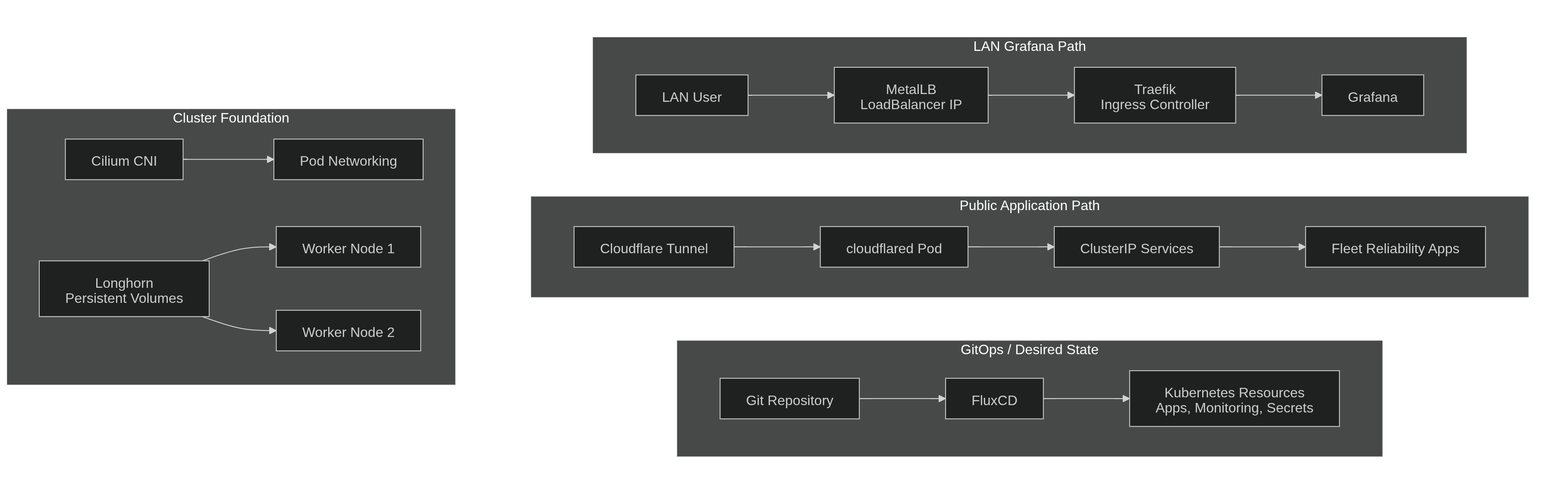
See page diagram above.
The important point is that there are two different ingress paths:
- Public application traffic goes through Cloudflare Tunnel directly to Kubernetes
ClusterIPservices. - Grafana LAN traffic goes through Traefik, which gets a
LoadBalancerIP from MetalLB.
That distinction matters because not every application needs Traefik.
Architecture Decisions
| Component | Why it exists |
|---|---|
| Cilium | CNI for pod networking and future network observability with Hubble |
| Longhorn | Replicated persistent storage across worker nodes |
| MetalLB | LAN IP assignment for LoadBalancer services on bare metal |
| Traefik | Ingress controller for Grafana LAN access |
| cert-manager | Certificate lifecycle management over time |
| metrics-server | Resource metrics for kubectl top and autoscaling signals |
| SOPS + age | Encrypted GitOps secrets stored safely in Git |
| FluxCD | Continuous reconciliation from the Git repository |
| Cloudflare Tunnel | Public access without exposing the cluster directly to the internet |
The key platform lesson is this:
Flux is not the first thing you install.
Flux reconciles desired state, but it needs a working cluster foundation first. The cluster must be able to schedule pods, attach storage, assign network addresses, and decrypt secrets before GitOps can safely take over.
Bootstrap Layer vs GitOps Layer
This was the most important mental model from the migration.
| Layer | What belongs here | Who applies it first |
|---|---|---|
| Bootstrap | Cilium, Longhorn, MetalLB, SOPS age secret, initial controllers | Manual or scripted bootstrap |
| GitOps | Applications, monitoring, config drift, Renovate, app secrets, HelmReleases | FluxCD |
It is fine for bootstrap resources to live in Git. In fact, they should live in Git.
But they cannot always be applied by Flux on day zero, because Flux depends on some of those resources already existing.
MetalLB is a good example. Its configuration can live in the repository, but the cluster needs MetalLB installed before a LoadBalancer service can receive a LAN IP. The same applies to the SOPS age private key. The encrypted files can be in Git, but Flux cannot decrypt them until the private key exists in the flux-system namespace.
GitOps does not remove the bootstrap problem. It makes the post-bootstrap state cleaner and repeatable.
Lesson 1: local-path Does Not Belong in a Multi-Node Cluster
The first hard requirement was storage.
K3s ships with the local-path provisioner. It is convenient on a single node, but it becomes painful in a multi-node cluster because volume data is pinned to one node’s disk.
If that node goes down, the pod cannot simply restart somewhere else. It waits for storage that only exists on the missing node.
That is how pods get stuck in Pending.
Longhorn solved this by providing replicated persistent volumes across worker nodes. Since this cluster had two worker nodes, I set the default replica count to 2. Longhorn commonly defaults to 3, but with only two worker nodes that creates avoidable replica placement warnings.
Install Longhorn prerequisites
Longhorn needs the required storage dependencies on every node where Longhorn components and volumes may run. On Ubuntu/Debian nodes, install and enable open-iscsi:
# Run on the control plane and both workers
sudo apt-get update
sudo apt-get install -y open-iscsi
sudo systemctl enable --now iscsid
Then verify the environment before installing Longhorn:
curl -sSfL https://raw.githubusercontent.com/longhorn/longhorn/v1.11.2/scripts/environment_check.sh | bashKeep the control plane out of storage scheduling
The control plane should run control plane work. I did not want it storing workload volume replicas.
Ideally, label the control plane before installing Longhorn:
kubectl label node <control-plane-node-name> \
  node.longhorn.io/create-default-disk=false \
  --overwrite
If Longhorn is already installed, do not assume this label alone has fixed the scheduling state. Open the Longhorn UI and verify that scheduling is disabled for the control plane node.
Install Longhorn
helm repo add longhorn https://charts.longhorn.io
helm repo update

helm upgrade --install longhorn longhorn/longhorn \
  --namespace longhorn-system \
  --create-namespace \
  --version 1.11.2 \
  --set defaultSettings.defaultReplicaCount=2
Verify the install:
kubectl -n longhorn-system get pods
kubectl get storageclass
The longhorn storage class should be present. If it is your default storage class, new PVCs without an explicit storageClassName can bind through Longhorn.
Update PVC manifests
The existing manifests were still tied to K3s:
storageClassName: local-pathThose had to become:
storageClassName: longhornIn my case, I changed five PVCs:
apps/base/audiobookshelf/storage.yaml- 4 PVCsapps/base/linkding/storage.yaml- 1 PVC
Then I committed the change:
git add apps/base/audiobookshelf/storage.yaml apps/base/linkding/storage.yaml
git commit -m "chore: migrate storageClassName from local-path to longhorn"
git push
The verification command is simple:
kubectl get pvc -AAll expected PVCs should eventually become Bound after the manifests reconcile.
Lesson 2: Bare Metal Needs a Load Balancer Story
Cloud providers make LoadBalancer services feel automatic. Bare metal does not.
On a bare-metal Kubernetes cluster, a LoadBalancer service can sit in <pending> forever unless something assigns and advertises an IP address. For this cluster, that job belonged to MetalLB.
The LAN design was:
- LAN subnet:
192.168.1.0/24 - Router DHCP range:
192.168.1.100-192.168.1.199 - MetalLB pool:
192.168.1.200-192.168.1.210 - Mode: Layer 2 ARP announcements
- CNI: Cilium
- kube-proxy: still running
The key idea is simple: do not let MetalLB use addresses that your router may also hand out through DHCP.
Enable strictARP when needed
If kube-proxy is running in IPVS mode, enable strictARP. This prevents ARP behavior that can cause multiple nodes to incorrectly answer for a load balancer IP.
kubectl get configmap kube-proxy -n kube-system -o yaml | \
  sed -e "s/strictARP: false/strictARP: true/" | \
  kubectl apply -f - -n kube-system
Then restart kube-proxy pods if needed:
kubectl -n kube-system rollout restart daemonset kube-proxyThis is one of those small networking details that can make bare-metal Kubernetes feel mysterious when it is not set correctly.
Install MetalLB
I first tried Helm with FRR disabled, but hit a chart rendering issue where the frr-k8s subchart templates still rendered and failed around a serviceMonitor value.
For native Layer 2 mode, the manifest install was cleaner:
kubectl apply -f https://raw.githubusercontent.com/metallb/metallb/v0.16.0/config/manifests/metallb-native.yamlWait for the pods:
kubectl -n metallb-system get podsConfigure the IP pool
MetalLB is installed at this point, but it still needs to know which IP addresses it is allowed to assign.
I used an IPAddressPool and an L2Advertisement:
apiVersion: metallb.io/v1beta1
kind: IPAddressPool
metadata:
  name: lan-pool
  namespace: metallb-system
spec:
  addresses:
    - 192.168.1.200-192.168.1.210
---
apiVersion: metallb.io/v1beta1
kind: L2Advertisement
metadata:
  name: lan-advertisement
  namespace: metallb-system
spec:
  ipAddressPools:
    - lan-pool
In my repository, this lived at:
infrastructure/controllers/base/metallb/config.yamlI applied it manually during bootstrap:
kubectl apply -f infrastructure/controllers/base/metallb/config.yamlThen verified it:
kubectl -n metallb-system get ipaddresspools
kubectl -n metallb-system get l2advertisements
The pool should be visible before any LoadBalancer service can receive an external IP.
Lesson 3: Not Every App Needs Traefik
This was a useful architecture correction.
Not every app needs a Kubernetes Ingress controller.
In this deployment, public application traffic goes through cloudflared directly to Kubernetes ClusterIP service DNS names:
linkdingfleetmindaiaudiobookshelf
That traffic does not pass through Traefik.
Traefik stayed in the platform only because Grafana already used:
ingressClassName: traefikSo Traefik was not the universal north-south entry point. It was a compatibility component for the workload that still expected Kubernetes Ingress.
If Grafana also moves behind Cloudflare Tunnel later, then Traefik and MetalLB may no longer be required for this environment.
Until then, Grafana needs an ingress controller, and the ingress controller needs a LAN IP.
helm repo add traefik https://traefik.github.io/charts
helm repo update

helm upgrade --install traefik traefik/traefik \
  --namespace traefik \
  --create-namespace \
  --set service.type=LoadBalancer
Then check whether MetalLB assigned an IP:
kubectl -n traefik get svc traefikThe EXTERNAL-IP should be an address from the MetalLB pool, not <pending>.
Lesson 4: cert-manager Is the Better Direction for TLS
The old setup used a manually encrypted Grafana TLS secret. That works, but it creates operational drag:
- manual certificate generation
- manual renewal
- manual secret replacement
- another secret to keep encrypted and synchronized
cert-manager is the better direction because certificate lifecycle management belongs inside the platform.
For a reproducible install, pin the cert-manager version instead of using latest:
kubectl apply -f https://github.com/cert-manager/cert-manager/releases/download/v1.20.2/cert-manager.yamlWait for the cert-manager pods:
kubectl wait --namespace cert-manager \
  --for=condition=ready pod \
  --selector=app.kubernetes.io/instance=cert-manager \
  --timeout=120s
Verify:
kubectl -n cert-manager get podsThe controller, cainjector, and webhook should all be running.
The actual issuer and Grafana TLS migration can happen after the cluster is stable. During migration, the important step is getting the certificate controller installed and healthy.
Lesson 5: Install metrics-server Early
You do not want to troubleshoot a new cluster blind.
metrics-server enables quick resource checks such as:
kubectl top nodeskubectl top pods -A- resource metrics used by autoscaling features
Install it:
kubectl apply -f https://github.com/kubernetes-sigs/metrics-server/releases/latest/download/components.yamlVerify:
kubectl top nodes
kubectl top pods -A
If kubectl top works, basic resource metrics are flowing.
One important distinction: metrics-server is not a replacement for Prometheus, Grafana, or a full observability stack. It is mainly for Kubernetes resource metrics and quick operational checks.
Lesson 6: Flux Cannot Decrypt Secrets Without the age Private Key
This is easy to forget during a rebuild.
The Git repository contains SOPS-encrypted manifests, but Flux cannot decrypt them unless the cluster has the age private key in the flux-system namespace.
Create the namespace first:
kubectl create namespace flux-systemCopy the age private key to the control plane temporarily:
scp /path/to/age.agekey <user>@<control-plane-ip>:/tmp/age.agekeyCreate the secret:
kubectl create secret generic sops-age \
  --namespace=flux-system \
  --from-file=age.agekey=/tmp/age.agekey
Delete the temporary key from the control plane immediately:
rm /tmp/age.agekeyVerify:
kubectl -n flux-system get secret sops-ageIf this secret is missing or wrong, Flux may pull the repository successfully but fail when it reaches encrypted manifests.
That failure can look confusing if you forget that decryption is now a cluster dependency.
Lesson 7: Bootstrap Flux After the Foundation Exists
Once storage, load balancing, metrics, certificates, and secret decryption are ready, Flux can take over.
Install the Flux CLI on the control plane:
curl -s https://fluxcd.io/install.sh | sudo bash
flux --version
Create a GitHub token with the least permission needed for your bootstrap method. For a lab, a classic token with repo scope works. For a cleaner setup, prefer a fine-grained token or deploy-key-based approach where possible.
Then bootstrap against the existing repository:
export GITHUB_TOKEN=<your-token-here>

flux bootstrap github \
  --owner=endiesworld \
  --repository=hml-project-1 \
  --branch=main \
  --path=clusters/staging \
  --personal
After bootstrap, Flux reconciles the platform from Git.
In my case, the order was roughly:
infrastructure-controllers- supporting infrastructure controllers and Renovatemonitoring-controllers- kube-prometheus-stackmonitoring-configs- Grafana TLS and monitoring configurationapps- linkding, fleetmindai, cloudflared, audiobookshelf
Watch reconciliation:
flux get kustomizations -A --watchThen verify the basics:
kubectl get pods -A
kubectl get pvc -A
flux get all -A
kubectl get events -A --sort-by=.lastTimestamp
At this point, GitOps is no longer just installed. It is actually useful because the cluster foundation is ready to support what Flux is applying.
Final Verification Checklist
These are the checks I want clean before calling the migration done.
# Flux health
flux get kustomizations -A
flux get helmreleases -A

# Application pods
kubectl get pods -A

# Storage
kubectl get pvc -A
kubectl get storageclass

# Networking
kubectl -n traefik get svc traefik
kubectl get ingress -A
kubectl -n cloudflared get pods

# Monitoring
kubectl -n monitoring get pods
kubectl -n monitoring get ingress

# Metrics
kubectl top nodes
kubectl top pods -A

# Recent cluster events
kubectl get events -A --sort-by=.lastTimestamp
Troubleshooting Matrix
| Symptom | Start here |
|---|---|
| Flux decryption errors | Check the sops-age secret and Flux Kustomization decryption config |
LoadBalancer service stuck in <pending> | Check MetalLB controller, IPAddressPool, and L2Advertisement |
PVC stuck in Pending | Check the storage class, Longhorn pods, and Longhorn node scheduling |
| Grafana ingress unreachable | Check Traefik service external IP, ingress class, and LAN routing |
kubectl top fails | Check metrics-server pods and the metrics API |
| App works locally but not publicly | Check cloudflared config, service DNS name, and tunnel logs |
| Pod scheduled but volume will not attach | Check Longhorn volume state, replica health, and node availability |
Useful commands:
# Flux errors
flux get all -A
kubectl -n flux-system logs deploy/source-controller --tail=100
kubectl -n flux-system logs deploy/kustomize-controller --tail=100

# Pod failures
kubectl get events -A --sort-by=.lastTimestamp
kubectl -n <namespace> describe pod <pod-name>
kubectl -n <namespace> logs deploy/<name> --tail=200

# SOPS secret
kubectl -n flux-system get secret sops-age
kubectl -n flux-system describe secret sops-age

# PVC issues
kubectl get storageclass
kubectl describe pvc <pvc-name> -n <namespace>

# MetalLB issues
kubectl -n metallb-system get ipaddresspools
kubectl -n metallb-system get l2advertisements
kubectl -n metallb-system get pods
kubectl -n metallb-system logs deploy/controller --tail=100
What I Would Improve Next
The migration gets the platform running, but there are still follow-up tasks worth doing:
- Move Grafana TLS from a manual SOPS secret to a cert-manager
Certificate. - Put MetalLB configuration fully under Flux management after bootstrap.
- Confirm Longhorn shows both workers with scheduling enabled and the control plane disabled.
- Enable Cilium Hubble UI for network observability.
- Pin
cloudflare/cloudflaredto a specific image tag instead of usinglatest. - Test Longhorn backup and restore, not just volume replication.
- Document the disaster recovery path for rebuilding Flux, SOPS, and the bootstrap layer.
The backup and restore point matters. Replication is not the same as recovery. A reliability platform should prove that data can be restored, not only that it can be replicated.
Final Takeaway
The biggest lesson from this migration is that GitOps does not remove the need for a working platform foundation.
Flux is excellent once the cluster can schedule pods, attach storage, assign network addresses, route traffic, collect basic metrics, and decrypt secrets. But on bare-metal Kubernetes, those pieces do not appear automatically.
K3s gave me a productive starting point.
Bare-metal Kubernetes forced me to understand the platform boundaries.
That is a good trade if the goal is to run something closer to a real reliability platform instead of only a convenient lab.
Comments