Deploying n8n on Kubernetes with CloudNativePG, PVCs, and a ClusterIP Service
A practical walkthrough for running n8n on Kubernetes with Flux GitOps: wiring ConfigMaps, SOPS-managed secrets, CloudNativePG database credentials, persistent storage, and a ClusterIP Service behind Cloudflare Tunnel.
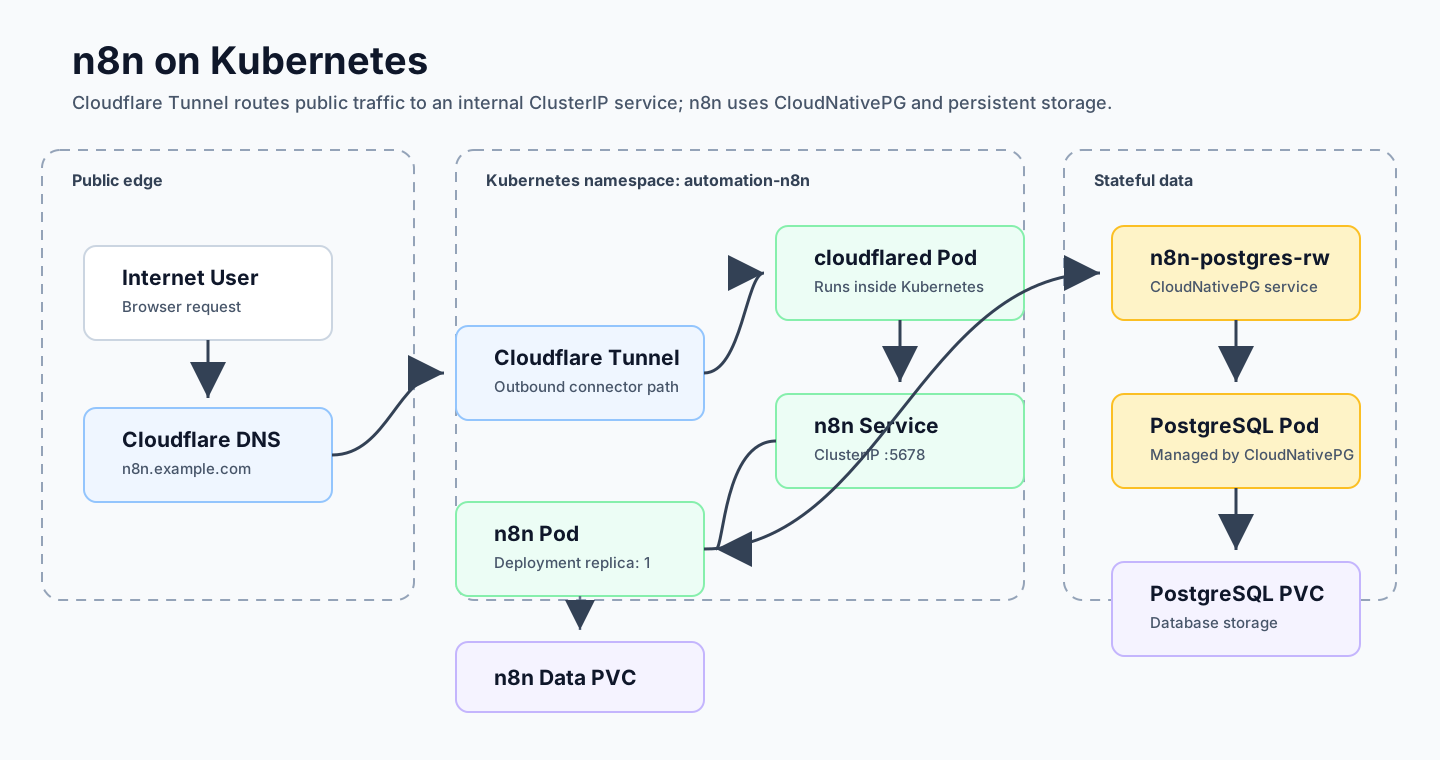
Running n8n in Kubernetes is not just “make a Deployment and expose a port.”
The working setup has a few moving parts:
- n8n needs normal environment configuration from a ConfigMap
- sensitive values need to come from Kubernetes Secrets
- PostgreSQL credentials are generated by CloudNativePG
/home/node/.n8nstill needs persistent storage- the Service only needs to be internal because Cloudflare Tunnel handles public traffic
This post walks through the Deployment and Service layer I used for my homelab n8n setup.
Setup context: Kubernetes homelab, Flux GitOps, CloudNativePG for PostgreSQL, SOPS + age for encrypted secrets, Cloudflare Tunnel for public access.
Architecture Diagram
Use the main page diagram above as the visual reference for the traffic path.
The core traffic path is:
Internet User
  ↓
Cloudflare DNS
  ↓
Cloudflare Tunnel
  ↓
cloudflared Pod
  ↓
n8n Service
  ↓
n8n Pod
  ↓
n8n-postgres-rw Service
  ↓
CloudNativePG PostgreSQL Pod
  ↓
PostgreSQL PVC
The n8n pod also mounts its own n8n-data PVC at /home/node/.n8n.
The Mental Model
I split the app into two GitOps layers:
automation-configs
  ├── namespace
  ├── ConfigMap
  ├── encrypted Secret
  ├── PVC
  └── CloudNativePG PostgreSQL Cluster

automation-controllers
  ├── n8n Deployment
  └── n8n Service
The Deployment should not create the database, Secret, ConfigMap, or PVC.
It should only consume them.
That distinction matters because Flux needs to apply things in the right order:
automation-configs
  ↓
automation-controllers
If the n8n pod starts before the ConfigMap, Secrets, PVC, or PostgreSQL service exist, it can fail with CreateContainerConfigError, CrashLoopBackOff, or a database connection error.
Repository Layout
The Deployment and Service live in the controller layer:
automation/controllers/base/n8n/
├── kustomization.yaml
├── n8n.yaml
└── service.yaml
The staging overlay references the base:
automation/controllers/staging/n8n/
└── kustomization.yaml
The base Kustomization is intentionally small:
apiVersion: kustomize.config.k8s.io/v1beta1
kind: Kustomization

resources:
  - n8n.yaml
  - service.yaml
And the staging Kustomization can simply point at the base:
apiVersion: kustomize.config.k8s.io/v1beta1
kind: Kustomization

resources:
  - ../../base/n8n
The n8n Deployment
Here is the final Deployment:
apiVersion: apps/v1
kind: Deployment
metadata:
  name: n8n
  namespace: automation-n8n
  labels:
    app: n8n
spec:
  replicas: 1

  selector:
    matchLabels:
      app: n8n

  template:
    metadata:
      labels:
        app: n8n

    spec:
      securityContext:
        fsGroup: 1000

      initContainers:
        - name: fix-n8n-data-permissions
          image: busybox:1.36
          command:
            - sh
            - -c
            - chown -R 1000:1000 /home/node/.n8n
          volumeMounts:
            - name: n8n-data
              mountPath: /home/node/.n8n

      containers:
        - name: n8n
          image: docker.n8n.io/n8nio/n8n
          ports:
            - name: http
              containerPort: 5678
              protocol: TCP

          securityContext:
            runAsUser: 1000
            runAsGroup: 1000

          env:
            - name: DB_POSTGRESDB_DATABASE
              valueFrom:
                secretKeyRef:
                  name: n8n-postgres-app
                  key: dbname

            - name: DB_POSTGRESDB_HOST
              valueFrom:
                secretKeyRef:
                  name: n8n-postgres-app
                  key: host

            - name: DB_POSTGRESDB_PORT
              valueFrom:
                secretKeyRef:
                  name: n8n-postgres-app
                  key: port

            - name: DB_POSTGRESDB_USER
              valueFrom:
                secretKeyRef:
                  name: n8n-postgres-app
                  key: username

            - name: DB_POSTGRESDB_PASSWORD
              valueFrom:
                secretKeyRef:
                  name: n8n-postgres-app
                  key: password

            - name: N8N_ENCRYPTION_KEY
              valueFrom:
                secretKeyRef:
                  name: n8n-encrypt-key
                  key: N8N_ENCRYPTION_KEY

          envFrom:
            - configMapRef:
                name: n8n-config

          volumeMounts:
            - name: n8n-data
              mountPath: /home/node/.n8n

      volumes:
        - name: n8n-data
          persistentVolumeClaim:
            claimName: n8n-data
Let’s break down the parts that matter.
Why One Replica?
replicas: 1For this deployment, one replica is intentional.
n8n is stateful, the /home/node/.n8n volume is mounted from a PVC, and this setup does not yet use n8n queue mode. Scaling n8n horizontally should be handled later with the right queue and worker architecture.
One pod is the correct starting point for a simple, reliable homelab deployment.
Loading Non-Secret Config from a ConfigMap
The Deployment loads normal runtime settings from n8n-config:
envFrom:
  - configMapRef:
      name: n8n-config
That ConfigMap contains values like:
GENERIC_TIMEZONETZN8N_EDITOR_BASE_URLWEBHOOK_URLN8N_HOSTN8N_PROTOCOLN8N_PORTN8N_PROXY_HOPSDB_TYPEDB_POSTGRESDB_SCHEMA
Using envFrom keeps the Deployment clean. Non-sensitive app settings live in the config layer, and the Deployment consumes them as environment variables.
Mapping CloudNativePG Secrets to n8n Variables
CloudNativePG generates an application Secret:
n8n-postgres-appThe keys in that Secret do not directly match the environment variable names n8n expects, so the Deployment maps them explicitly.
For example, the database name:
- name: DB_POSTGRESDB_DATABASE
  valueFrom:
    secretKeyRef:
      name: n8n-postgres-app
      key: dbname
The database host:
- name: DB_POSTGRESDB_HOST
  valueFrom:
    secretKeyRef:
      name: n8n-postgres-app
      key: host
The username:
- name: DB_POSTGRESDB_USER
  valueFrom:
    secretKeyRef:
      name: n8n-postgres-app
      key: username
And the password:
- name: DB_POSTGRESDB_PASSWORD
  valueFrom:
    secretKeyRef:
      name: n8n-postgres-app
      key: password
This is the right place for secretKeyRef: the Secret exists already, but the app needs specific variable names.
Keeping the n8n Encryption Key Out of the Deployment
n8n also needs a stable encryption key:
- name: N8N_ENCRYPTION_KEY
  valueFrom:
    secretKeyRef:
      name: n8n-encrypt-key
      key: N8N_ENCRYPTION_KEY
That Secret is managed separately and encrypted in Git with SOPS + age.
The important rule: do not bake the encryption key into the Deployment manifest. If the key changes unexpectedly, previously encrypted n8n credentials can become unusable.
Why n8n Still Needs a PVC
Even with PostgreSQL enabled, n8n still needs persistent storage at:
/home/node/.n8nThe Deployment mounts the PVC here:
volumeMounts:
  - name: n8n-data
    mountPath: /home/node/.n8n
And wires it to the n8n-data claim:
volumes:
  - name: n8n-data
    persistentVolumeClaim:
      claimName: n8n-data
This is separate from PostgreSQL storage. PostgreSQL stores workflow and execution data, but n8n still uses its application directory for runtime configuration and related files.
The Docker-style mental model:
n8n_data:/home/node/.n8nbecomes this Kubernetes model:
n8n-data PVC -> /home/node/.n8nThe PVC Permission Problem
This was the blocker that caused the pod to crash:
Error: EACCES: permission denied, open '/home/node/.n8n/config'The PVC mounted successfully, but n8n could not write to it.
That usually means the mounted volume is owned by root, while the n8n process runs as the node user. In this image, that maps cleanly to:
UID: 1000
GID: 1000
The fix has three parts.
First, set the pod-level group:
securityContext:
  fsGroup: 1000
Then run the main container as the same user and group:
securityContext:
  runAsUser: 1000
  runAsGroup: 1000
Finally, use an initContainer to repair ownership before n8n starts:
initContainers:
  - name: fix-n8n-data-permissions
    image: busybox:1.36
    command:
      - sh
      - -c
      - chown -R 1000:1000 /home/node/.n8n
    volumeMounts:
      - name: n8n-data
        mountPath: /home/node/.n8n
After that, n8n can write to /home/node/.n8n/config and the pod can start normally.
The n8n Service
The Service is intentionally internal:
apiVersion: v1
kind: Service
metadata:
  name: n8n
  namespace: automation-n8n
  labels:
    app: n8n
spec:
  type: ClusterIP
  selector:
    app: n8n
  ports:
    - name: http
      protocol: TCP
      port: 5678
      targetPort: 5678
The selector must match the pod label:
Deployment pod label: app=n8n
Service selector:     app=n8n
If those do not match, the Service will have no endpoints.
Check that with:
kubectl get endpoints n8n -n automation-n8nIf the endpoints are empty:
kubectl describe svc n8n -n automation-n8n
kubectl get pods -n automation-n8n --show-labels
Why ClusterIP Is Enough
The Service does not need to be a NodePort or LoadBalancer.
External traffic flows through Cloudflare Tunnel:
Cloudflare edge
  ↓
cloudflared pod
  ↓
n8n ClusterIP Service
  ↓
n8n pod
The internal service URL is:
http://n8n.automation-n8n.svc.cluster.local:5678And the cloudflared route points to that URL:
- hostname: n8n.example.com
  service: http://n8n.automation-n8n.svc.cluster.local:5678
If public access fails, prove the internal route first. Do not debug Cloudflare until the Kubernetes Service works from inside the cluster.
Verification Order
The verification order matters. I check from the inside out:
Flux
  ↓
Config resources
  ↓
Database resources
  ↓
n8n Deployment
  ↓
n8n Service
  ↓
Internal connectivity
  ↓
Cloudflare Tunnel
  ↓
Public URL
Start with Flux:
flux get kustomizationsThe important entries should be ready:
infrastructure-controllers   Ready=True
automation-configs           Ready=True
automation-controllers       Ready=True
Then check the namespace:
kubectl get ns automation-n8n
kubectl get all -n automation-n8n
Check the config-layer resources:
kubectl get configmap n8n-config -n automation-n8n
kubectl get secret n8n-encrypt-key -n automation-n8n
kubectl get secret n8n-postgres-app -n automation-n8n
kubectl get pvc n8n-data -n automation-n8n
Check CloudNativePG:
kubectl get cluster -n automation-n8n
kubectl get pods -n automation-n8n | grep postgres
kubectl get svc -n automation-n8n | grep postgres
Check the n8n workload:
kubectl get deployment n8n -n automation-n8n
kubectl get pods -n automation-n8n -l app=n8n -o wide
kubectl logs -n automation-n8n deploy/n8n --tail=100
If the pod recently crashed, previous logs are usually more useful:
kubectl logs -n automation-n8n deploy/n8n --previous --tail=100Then check the Service:
kubectl get svc n8n -n automation-n8n
kubectl get endpoints n8n -n automation-n8n
The endpoint should show a pod IP on port 5678.
Test Internal Connectivity First
Before opening the browser, test the internal service route from inside the cluster:
kubectl run curl-test \
  -n cloudflared \
  --rm -it \
  --image=curlimages/curl \
  --restart=Never \
  -- curl -I http://n8n.automation-n8n.svc.cluster.local:5678
If this fails, the problem is still inside Kubernetes.
Debug:
- n8n pod
- n8n logs
- n8n Service
- n8n endpoints
Only after internal connectivity works should you test the public hostname:
curl -I https://n8n.example.comQuick Diagnosis Table
| Symptom | Likely Meaning | First Place to Check |
|---|---|---|
no matches for kind "Cluster" | CloudNativePG CRD missing | infrastructure-controllers, CNPG CRDs |
dependency ... not ready | Upstream Flux layer failed | Parent Flux Kustomization |
CreateContainerConfigError | Missing ConfigMap or Secret | Pod describe output |
CrashLoopBackOff | Container starts then exits | n8n logs |
EACCES /home/node/.n8n/config | PVC permission issue | Deployment securityContext/initContainer |
| Service has no endpoints | Selector mismatch or pod not ready | Service selector and pod labels |
Browser shows 502 | Backend unhealthy or unreachable | n8n pod, Service, endpoints |
Browser shows 404 | cloudflared route mismatch | cloudflared ConfigMap |
What I Would Harden Next
This Deployment works, but it is not the final production-grade version.
The next improvements are:
- pin the n8n image tag instead of using the floating default
- add resource requests and limits
- add readiness and liveness probes after testing them carefully
- configure Cloudflare Access
- define PostgreSQL and n8n PVC backup strategy
- monitor pod restarts, PVC usage, and CloudNativePG health
- consider NetworkPolicy
- consider n8n queue mode before scaling beyond one pod
For example, the image should eventually become:
image: docker.n8n.io/n8nio/n8n:<version>And resources should be explicit:
resources:
  requests:
    cpu: 100m
    memory: 256Mi
  limits:
    cpu: 1000m
    memory: 1Gi
Probes are useful, but they should be tested before committing them. A bad probe can restart a healthy app and make the deployment less stable.
Final Mental Model
The final runtime flow is the same path shown in the architecture diagram: n8n loads its config and secrets, mounts the n8n-data PVC, connects to CloudNativePG through n8n-postgres-rw, and is exposed internally through the n8n Service before Cloudflare Tunnel routes public traffic to it.
The biggest lesson from this setup: Kubernetes can mount a volume successfully and the application can still fail if the file permissions are wrong.
For this n8n deployment, the final blocker was not Flux, Cloudflare, or PostgreSQL. It was the simple fact that the app could not write to /home/node/.n8n/config.
Once the PVC permissions were fixed and the Service had endpoints, Cloudflare Tunnel was just the final routing layer.
Comments