I Broke My Tunnel So You Don't Have To: GitOps Secrets with Flux + SOPS + age
A beginner-friendly, real-world guide to managing Kubernetes secrets in GitOps: encrypt in Git with SOPS/age, decrypt in-cluster with Flux.
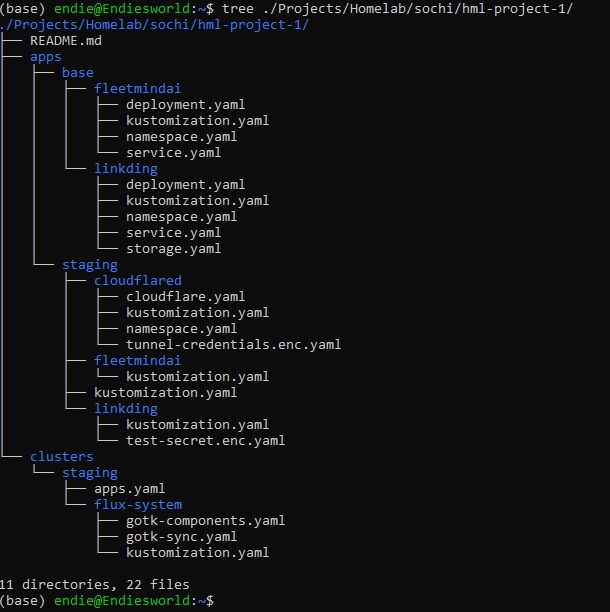
I run a homelab with Flux GitOps, and I recently hit one of those painful moments:
- I deleted a tunnel secret
- restarted workloads
- and watched
cloudflaredcrash-loop
The root cause was simple and costly: secret format mismatch + malformed JSON.
This post is the clean, basic playbook I now use for secrets in GitOps. By the end of this guide, you’ll be able to:
- Keep Kubernetes secret manifests encrypted in Git
- Decrypt them only inside the cluster with Flux
- Avoid common failures (
no matching creation rules, bad JSON, wrong secret key/file shape)
Setup context: K3s single node cluster, Flux v2 bootstrapped to GitHub, SOPS with age encryption, WSL2 as the operator workstation.
First Principles (Quick, Important)
- Kubernetes
Secretstores sensitive values. datauses base64-encoded values.stringDataaccepts plaintext and Kubernetes converts it todataon apply.- Base64 is encoding, not encryption. Anyone with access to the manifest or the API server can decode it trivially.
That means: if you commit plaintext or base64-encoded secret values to Git, your secret is effectively exposed to anyone with repo access.
The Model: Encrypt in Git, Decrypt in Cluster
Workstation / WSL
- Install
age+sops - Generate an age keypair
- Encrypt secret manifests with the age public key
- Commit only the encrypted YAML to Git
Cluster (Flux)
- Store the age private key as a Secret in
flux-system - Flux pulls the Git revision
- Flux decrypts with SOPS during reconciliation
- The decrypted resource is applied to the API server
The separation is important: your Git repo never contains a decryptable secret. Only the cluster, which holds the private key, can recover the plaintext values.
Prerequisites
- Flux v2 installed and bootstrapped
kubectlaccess to the cluster- GitOps repo already syncing via Flux
- Workstation tools:
age,sops
1) Install Tooling
Install age (Ubuntu/WSL)
sudo apt update
sudo apt install -y age
age --version
Install sops
Download the latest binary from the SOPS releases page:
# Replace the version with the latest from the releases page
SOPS_VERSION=3.9.4
curl -LO "https://github.com/getsops/sops/releases/download/v${SOPS_VERSION}/sops-v${SOPS_VERSION}.linux.amd64"
sudo mv "sops-v${SOPS_VERSION}.linux.amd64" /usr/local/bin/sops
sudo chmod +x /usr/local/bin/sops
sops --version
2) Generate age Keys (One-Time)
mkdir -p ~/.config/sops/age
age-keygen -o ~/.config/sops/age/keys.txt
Extract the public key:
age-keygen -y ~/.config/sops/age/keys.txt~/.config/sops/age/keys.txt= private key (never commit)age1...output = public key (safe to use for encryption)
Why this path? SOPS automatically looks for age keys at
~/.config/sops/age/keys.txt. Storing your key here means you don’t need to setSOPS_AGE_KEY_FILEevery time you run a SOPS command.
Add a safeguard to your gitignore:
# In your GitOps repo root
echo "*.agekey" >> .gitignore
echo "keys.txt" >> .gitignore
3) Store the Private Key in Cluster (One-Time per Cluster)
cat ~/.config/sops/age/keys.txt | kubectl create secret generic sops-age \
  --namespace=flux-system \
  --from-file=age.agekey=/dev/stdin
Verify:
kubectl -n flux-system get secret sops-age4) Configure Flux Kustomization for Decryption
In your Flux Kustomization (example: clusters/staging/apps.yaml):
apiVersion: kustomize.toolkit.fluxcd.io/v1
kind: Kustomization
metadata:
  name: apps
  namespace: flux-system
spec:
  interval: 1m
  path: ./apps/staging
  prune: true
  sourceRef:
    kind: GitRepository
    name: flux-system
  decryption:
    provider: sops
    secretRef:
      name: sops-age
The decryption block tells Flux: “Before applying any resource in this path, try to decrypt it using SOPS with the age key stored in the sops-age secret.”
5) Add .sops.yaml at Repo Root
Create .sops.yaml in the repo root:
creation_rules:
  - path_regex: '(^|.*/)apps/staging/.*\.ya?ml$'
    encrypted_regex: '^(data|stringData)$'
    age: 'age1REPLACE_WITH_YOUR_PUBLIC_KEY'
Why this matters:
- SOPS uses this file to decide what to encrypt and with which key.
path_regexcontrols which files this rule applies to. If your file path doesn’t match, encryption fails witherror loading config: no matching creation rules found.encrypted_regextells SOPS to only encrypt thedataandstringDatafields. This is critical: Flux needs to read the unencrypted metadata (apiVersion,kind,metadata) to know how to apply the resource. Encrypting the entire file would make it unreadable to Flux’s reconciler.
Tip: If you have multiple environments or paths, add additional
creation_rulesentries. Rules are evaluated top to bottom; the first matching rule wins.
6) Create and Encrypt a Normal App Secret
Create a plaintext manifest locally:
kubectl -n my-app create secret generic app-secret \
  --from-literal=username=admin \
  --from-literal=password='replace-me' \
  --dry-run=client -o yaml > apps/staging/my-app/app-secret.yaml
Encrypt in place:
sops --encrypt --in-place apps/staging/my-app/app-secret.yamlVerify the file is encrypted (you should see sops metadata and ENC[AES256_GCM,...] values):
head -30 apps/staging/my-app/app-secret.yamlCommit the encrypted file only.
Editing encrypted secrets later: Run
sops apps/staging/my-app/app-secret.yamlto open the decrypted content in your editor. SOPS re-encrypts the file automatically when you save and exit.
Decrypting for debugging: Run
sops --decrypt apps/staging/my-app/app-secret.yamlto print the plaintext to stdout without modifying the file.
7) Cloudflared Special Case (Where I Failed First)
If your cloudflared config has:
credentials-file: /etc/cloudflared/creds/credentials.jsonthen your Kubernetes secret must contain exactly one key named credentials.json, and the value must be valid JSON.
Correct JSON Creation (Safe Quoting)
The cloudflared credentials file contains three fields. You can find these values in the JSON file generated by cloudflared tunnel create at ~/.cloudflared/<TUNNEL_UUID>.json:
cat > cloudflare.json <<'EOF'
{
  "AccountTag": "REPLACE_ACCOUNT_TAG",
  "TunnelSecret": "REPLACE_TUNNEL_SECRET",
  "TunnelID": "REPLACE_TUNNEL_ID"
}
EOF
Validate JSON:
jq -e . cloudflare.jsonBuild secret manifest with the proper file key:
kubectl -n cloudflared create secret generic tunnel-credentials \
  --from-file=credentials.json=cloudflare.json \
  --dry-run=client -o yaml > apps/staging/cloudflared/tunnel-credentials.yaml
Encrypt:src/content/blog/devops/secret-flux.mdx
sops --encrypt --in-place apps/staging/cloudflared/tunnel-credentials.yaml
rm -f cloudflare.json
8) Make Sure Kustomization Includes Encrypted Manifest
apps/staging/cloudflared/kustomization.yaml:
apiVersion: kustomize.config.k8s.io/v1beta1
kind: Kustomization
resources:
  - namespace.yaml
  - cloudflare.yaml
  - tunnel-credentials.yaml
9) Commit, Push, Reconcile
git add .sops.yaml apps/staging/cloudflared/tunnel-credentials.yaml apps/staging/my-app/app-secret.yaml
git diff --cached --stat  # Review what you're about to commit
git commit -m "Add encrypted secrets with SOPS + age"
git push

flux reconcile kustomization apps -n flux-system --with-source
Why not
git add .? In a repo that handles secrets, a broadgit addrisks staging an unencrypted file you forgot to process with SOPS. Always add specific paths and review withgit diff --cachedbefore committing.
10) Verify Quickly
kubectl -n cloudflared describe secret tunnel-credentials
kubectl -n cloudflared get pods
kubectl -n cloudflared logs deploy/cloudflared --tail=200
Decode and validate the mounted payload:
kubectl get secret tunnel-credentials -n cloudflared \
  -o jsonpath='{.data.credentials\.json}' | base64 -d | jq -e .
Troubleshooting (Real-World)
error loading config: no matching creation rules found
.sops.yamlis missing or in the wrong directorypath_regexdoesn’t match your file’s actual path relative to the repo root- You ran the
sopscommand from an unexpected working directory (SOPS resolves paths relative to where you run the command)
invalid character 'A' looking for beginning of object key string
- Malformed JSON in
credentials.json(usually caused by bad shell quoting or extra characters) - Validate with
jq -e .before creating the secret
Secret deleted but app still reachable
- Running pods can continue temporarily using cached data
- Failures appear on restart or reschedule when the required secret is missing from the API server
Cloudflared crash loop after secret update
- Wrong key name inside the secret (must be exactly
credentials.json) - Invalid JSON payload
- Mismatched
TunnelIDbetween the credentials and the cloudflared ConfigMap
Security Checklist
- Never commit plaintext secrets to Git
- Never commit your age private key (
keys.txt/*.agekey) - Add key file patterns to
.gitignore - Keep the
sops-agesecret only in theflux-systemnamespace - Encrypt before every push (
sops --encrypt --in-place) - Validate JSON with
jq -e .before creating file-based secrets - Review staged files with
git diff --cachedbefore committing - Rotate credentials immediately if exposed
Key Rotation
If your age key is compromised:
- Generate a new age keypair
- Update the
sops-agesecret in the cluster with the new private key - Update
.sops.yamlwith the new public key - Re-encrypt all secrets:
sops updatekeys <file>for each encrypted file - Commit and push the re-encrypted files
Wrapping Up
The mindset shift is this:
Git stores encrypted intent, not plaintext secret values.
Once Flux + SOPS + age is set up correctly, secret handling becomes repeatable, auditable, and calm — even in a homelab. The encryption and decryption happen automatically in the pipeline, and your Git history never contains a recoverable secret.
Comments